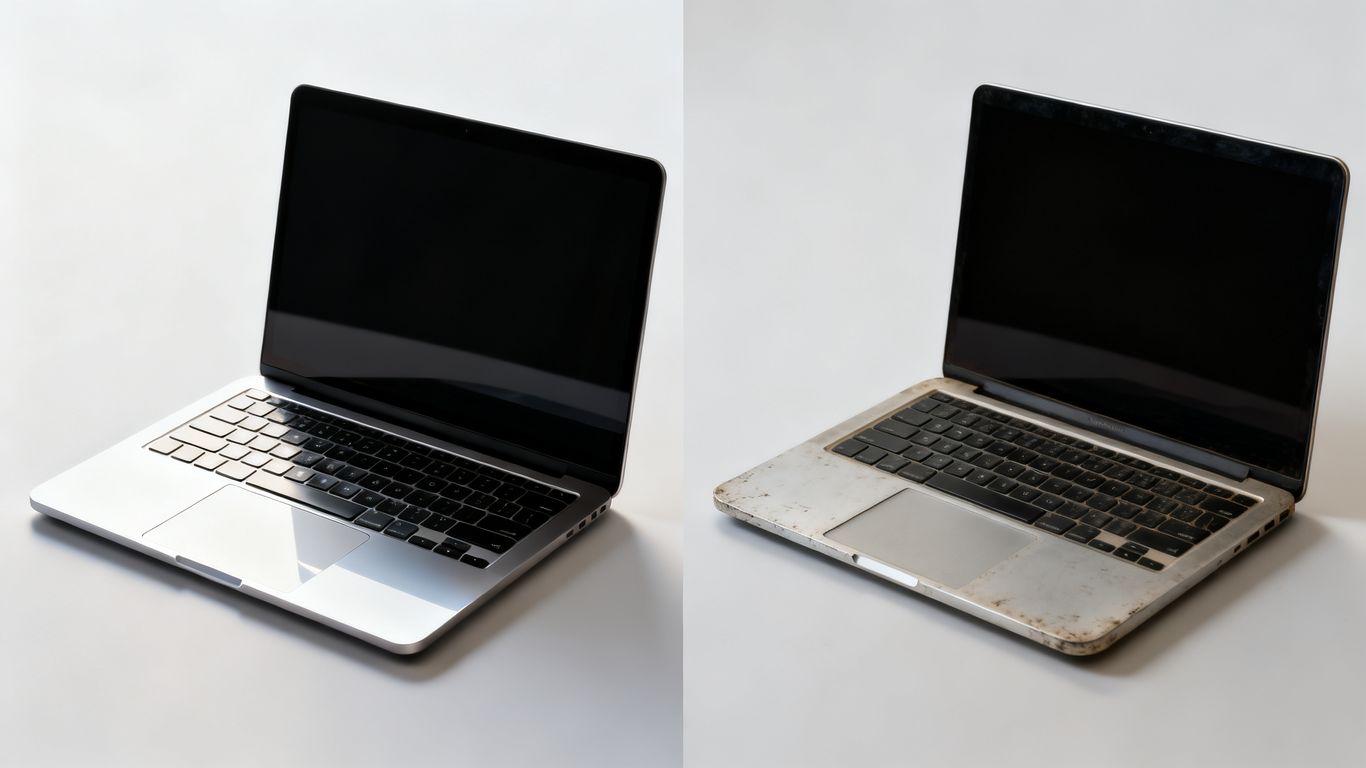
So, you're thinking about getting a new laptop in 2026, but the prices are making your eyes water. You've probably heard about refurbished vs used laptop options, and maybe you're wondering if they're any good. It's a smart move to look into these alternatives, because honestly, buying new isn't always the best path for everyone. Let's break down what you really need to know before you click that buy button.
Key Takeaways
- Refurbished laptops are tested, repaired, and cleaned by professionals, often coming with a warranty, while used laptops are typically sold as-is with no guarantees.
- You can save a significant amount of money by choosing a refurbished laptop over a new one, getting more performance for your budget.
- While used laptops might offer deeper discounts, refurbished models generally provide better reliability and peace of mind due to the checks and potential warranty.
- Buying refurbished is a great way to reduce electronic waste and is a more environmentally friendly choice compared to buying new.
- Consider a refurbished laptop if you're a student, budget-conscious professional, or anyone looking for good value, but opt for new if you absolutely need the latest AI features or top-tier gaming performance.
Understanding The Refurbished vs Used Laptop Distinction
So, you're looking for a laptop but trying to save some cash, right? That's smart. But when you start looking, you'll see terms like "refurbished" and "used" thrown around. They sound similar, but they're actually pretty different, and knowing that difference can save you a headache later on.
What Does "Refurbished" Truly Mean?
When a laptop is labeled "refurbished," it means someone, usually the manufacturer or a certified company, took it back. Maybe a customer returned it because they changed their mind, or it had a minor issue. Whatever the reason, this laptop didn't just get put back on the shelf. It went through a process. Think of it like this: it was inspected, any problems were fixed, it was cleaned up, and then tested to make sure it works like it should. It's essentially a pre-owned device that's been brought back to good working order. Many refurbished laptops come with a warranty, which is a big plus. It’s not just a used item; it’s been checked and fixed. You can often find these from places that specialize in selling them, like certified refurbished sellers.
The Nature of a "Used" Laptop
A "used" laptop, on the other hand, is pretty much what it sounds like: it's been owned and used by someone else. When you buy a used laptop, you're usually getting it as-is. There's no guarantee it's been checked for problems, fixed, or cleaned. It's sold in its current condition. This means you might find a great deal, but you could also end up with a machine that has hidden issues, like a worn-out battery or a glitchy keyboard. You're taking a bigger gamble with a used device.
Key Differences in Seller Guarantees
This is where the rubber meets the road. The biggest difference you'll notice is what the seller promises.
- Refurbished: Typically comes with some form of warranty (often 90 days to a year) and a return policy. This gives you peace of mind because if something goes wrong shortly after you buy it, you have recourse.
- Used: Often sold with no warranty or a very limited one. Returns might be difficult or impossible. You're mostly relying on the seller's description and your own inspection.
Here’s a quick rundown:
| Feature | Refurbished Laptop | Used Laptop |
|---|---|---|
| Inspection | Thoroughly tested and repaired | Usually sold as-is, no guarantee of checks |
| Condition | Restored to good working order, may have minor wear | Varies widely, can have significant wear/issues |
| Warranty | Often included (e.g., 90 days to 1 year) | Typically none or very limited |
| Return Policy | Usually available | Often limited or not available |
When you're looking at options, always check what the seller offers. A refurbished laptop from a reputable source often provides a much safer bet for your money, even if it costs a little more upfront than a basic used one. It's about balancing that initial price with the potential for future problems and repairs. You want a machine that works, not one that becomes a constant project.
Assessing Value: Cost Savings In Refurbished vs Used Laptop
Let's talk about the money. When you're looking at a refurbished laptop versus a used one, the price tag is usually the first thing that catches your eye. And honestly, that's a smart place to start. You're not just looking for a cheap machine; you're looking for the best bang for your buck, right?
Significant Price Reductions on Refurbished Models
Refurbished laptops are already a step up from buying brand new. Think about it: a laptop that was returned, maybe because someone changed their mind or it had a tiny cosmetic flaw, gets put back into shape. It's then sold at a lower price than its original retail cost. We're talking about getting a machine that's been checked, fixed if needed, and cleaned, but without paying that full, fresh-from-the-factory price. This means you can often snag a model with better specs than you could afford if you were buying new. For instance, a laptop that originally cost $1200 might be available refurbished for $800 or even less. It's a solid way to get more power for your money. You can often find great deals on refurbished MacBooks if that's your preference.
Potential for Deeper Discounts on Used Devices
Now, a 'used' laptop is a different story. This is typically a machine sold as-is. It might have been owned by someone for a while, and it's being passed on without the rigorous checks a refurbished unit goes through. Because of this, you can sometimes find even steeper discounts on used laptops compared to refurbished ones. If you're really on a tight budget, a used laptop might seem tempting. However, you need to be extra careful. The price might be lower, but what are you really getting? It's a bit of a gamble.
Balancing Price Against Lifespan and Condition
So, how do you figure out what's actually a good deal? It's all about balancing that initial cost with what you're getting in return. A refurbished laptop, even if it costs a bit more than a comparable used one, often comes with a warranty and has been tested. This means it's likely to last longer and perform more reliably. A used laptop might be cheaper upfront, but if it has hidden issues or a worn-out battery, you could end up spending more on repairs down the line. It's worth looking at the age of the laptop and its general condition. A slightly older refurbished model might offer better long-term value than a newer-looking used one that's been through a lot.
Here’s a quick way to think about it:
- Refurbished: Generally a safer bet. You pay a bit more than 'used' but get tested hardware, often a warranty, and a machine that's been brought back to good working order. Think of it as a pre-owned item that's been professionally spruced up.
- Used: The cheapest option, but comes with more risk. You're buying it 'as is,' so inspect it thoroughly. You might get lucky and find a gem, or you might end up with a machine that needs immediate attention.
When you're comparing, always ask yourself: what's the total cost of ownership going to be? Sometimes, paying a little more upfront for a refurbished device saves you money and headaches later on. It's about making a smart investment, not just a quick purchase. For a deeper dive into making the right choice, consider comparing refurbished and new laptops.
Reliability and Performance: Refurbished vs Used Laptop
Testing and Repair Processes for Refurbished Laptops
When you buy a refurbished laptop, you're getting a device that's been through a process. It's not just someone's old machine handed off to you. Reputable sellers, especially manufacturers themselves, put these laptops through a series of checks. They'll test everything from the screen and keyboard to the ports and battery. If something isn't up to par, they'll fix it or replace the faulty part. This means that a refurbished laptop, while not brand new, has been verified to work correctly. Think of it like a car that's had its engine checked and any issues fixed before being put back on the lot. You're getting a machine that's been given a second chance and a clean bill of health. This testing is a big part of why many people feel confident buying refurbished, as it significantly lowers the risk of immediate problems. It's a good idea to look for sellers who detail their refurbishment process; it shows they stand behind their products. You can often find great deals on last year's models that still pack a punch for everyday tasks. Check device health before you buy, if possible.
The "As-Is" Reality of Used Laptops
Now, a "used" laptop is a different story entirely. When you buy something listed as used, it's usually sold "as-is." This means exactly what it sounds like: you get it in whatever condition it's in, and that's that. There's no guarantee it's been checked, no promise that everything works perfectly, and certainly no expectation of repairs. The seller isn't obligated to tell you about any hidden problems, and once you hand over your money, it's your problem. This can be a gamble. You might get lucky and find a gem, but you could also end up with a machine that has a dying battery, a glitchy keyboard, or worse. It’s like buying a mystery box – you never quite know what you’re going to get. For most people, especially if you need a laptop for work or school, this level of uncertainty just isn't worth the potential savings. You're essentially taking on all the risk yourself.
Performance Expectations for Different Grades
When you're looking at refurbished options, the grade of the laptop can tell you a lot about what to expect performance-wise. Manufacturer-certified units are usually the closest to new, often with minimal cosmetic flaws and full functionality. Grade A laptops are also excellent, maybe with a tiny scratch you'd barely notice, but they perform just like you'd expect. Grade B might have some visible wear, like scuffs or small dents, but the internal performance should still be solid. Grade C is where you might start seeing more significant cosmetic issues, and while it should still function, you might notice it's a bit slower or older. It's important to remember that even a Grade B or C refurbished laptop has been tested and repaired, so it should still be reliable for its intended tasks. A used laptop, on the other hand, has no such grading system. Its performance is entirely dependent on its previous owner and how well it was maintained, which is often unknown.
Here’s a quick rundown:
- Manufacturer Certified: Near-perfect condition, full functionality, often comes with a warranty. Expect top-tier performance.
- Grade A: Excellent condition, minor cosmetic wear, fully functional. Performance is very close to new.
- Grade B: Good condition, visible wear but fully functional. Performance is reliable for most tasks.
- Grade C: Fair condition, noticeable cosmetic damage, functional. Performance might be noticeably older.
- Used (As-Is): Condition and performance are unknown. A total gamble.
For most buyers in 2026, aiming for a manufacturer-certified or Grade A refurbished laptop offers the best balance of performance, reliability, and value. You get a machine that's been checked and fixed, with a much lower chance of unexpected issues compared to a purely used device. This approach helps you get a capable machine without breaking the bank, and often with some form of warranty protection.
Warranty and Risk Mitigation For Buyers
When you're looking at laptops, especially if you're trying to save some cash, the warranty situation is a big deal. It's basically your safety net if something goes wrong.
Warranty Coverage on Refurbished Laptops
Most reputable sellers of refurbished laptops will include some kind of warranty. This is a huge plus. Think of it as the seller saying, "We stand by this machine." These warranties can range from 90 days to a full year. It's not usually as long as a brand-new laptop's warranty, but it's definitely better than nothing. This coverage is your primary protection against unexpected hardware failures. It means if the screen suddenly dies or the battery gives out a month after you buy it, you've got a way to get it fixed or replaced without paying out of pocket again. Always check the specifics of the warranty before you buy – what does it cover, and for how long? A good warranty can make a refurbished purchase feel a lot less risky.
Limited or No Protection for Used Laptops
Now, this is where things get dicey with 'used' laptops. When you buy a used laptop, especially from an individual seller or a place that doesn't specialize in refurbishing, it's often sold "as-is." This means exactly what it sounds like: you buy it, and whatever happens next is on you. There's typically no warranty, no return policy, and no recourse if it breaks down the next day. You're essentially taking a gamble. While you might get a lower price, you're also accepting a much higher level of risk. It’s like buying a lottery ticket – you might win big, or you might end up with a paperweight.
Return Policies and Buyer Peace of Mind
Beyond the warranty, look at the seller's return policy. Even with a warranty, sometimes a laptop just isn't right for you, or you discover a problem that the warranty doesn't cover. A good return policy, say 14 or 30 days, gives you a window to send it back for a refund or exchange if you're not satisfied. This is especially important for refurbished items where cosmetic condition can sometimes be a surprise. For used laptops, return policies are rare, so you really need to be sure about the device and the seller before handing over your money. Checking seller reviews can give you a good idea of how they handle issues and returns, which is a big part of feeling secure about your purchase. You can often find great deals on refurbished models with solid return options on sites like Newegg.
Environmental Considerations: A Greener Choice

Thinking about buying a laptop in 2026? You've probably got a lot on your mind, from specs to price. But have you considered the planet? It might sound a bit abstract, but choosing a refurbished laptop is actually a really practical way to be kinder to the environment. It's not just about feeling good; it's about making a tangible difference.
Reducing E-Waste Through Refurbished Purchases
Every year, tons of electronic waste pile up. When you buy a new laptop, you're contributing to that cycle. But when you opt for a refurbished one, you're giving a perfectly good machine a second life. This means fewer resources are mined for new components and less old tech ends up in landfills. It's a simple equation: less demand for new means less waste overall. Think about it – that laptop you're eyeing might have been returned for a minor issue or simply because someone wanted the latest model. Instead of letting it gather dust or become waste, it gets fixed up and ready for you. It’s a win-win.
The Carbon Footprint of New vs. Refurbished
Manufacturing a brand-new laptop takes a significant toll on the environment. Extracting raw materials, the energy used in production, and shipping all contribute to its carbon footprint. Studies show that buying a refurbished laptop can save a substantial amount of CO2 emissions. For instance, each remanufactured laptop can prevent around 316 kilograms of CO2 from entering the atmosphere. That's a big deal when you add it all up, especially if you're looking at bulk purchases for a business or school. Choosing refurbished is a direct way to lower your personal environmental impact. You can explore more about making eco-friendly choices when buying tech here.
Sustainability as a Purchasing Driver
For many of us, sustainability is becoming more than just a buzzword; it's a real factor in our buying decisions. We want our purchases to align with our values. Buying refurbished tech is a straightforward way to do that. It’s about being a more conscious consumer. You get a capable machine, often at a great price, and you also get the satisfaction of knowing you've made a more responsible choice. It’s about getting value for your money while also contributing to a healthier planet. This approach helps extend a device's lifecycle, which is a key part of reducing the overall environmental impact of technology. Each remanufactured laptop saves water and prevents CO2 emissions, making it a truly greener option.
Who Benefits Most From Refurbished Laptops?
So, you're thinking about a new laptop but don't want to break the bank. That's where refurbished models really shine. They're not just for people on a super tight budget; lots of different folks can get a great deal.
Students and Budget-Conscious Users
Let's face it, textbooks and tuition are expensive enough. A refurbished laptop can be a lifesaver. You can often get a machine that would cost a fortune new for a fraction of the price. This means you can afford a laptop with better specs than you might otherwise, which is great for research, writing papers, and maybe even some light gaming between classes. You get more bang for your buck, plain and simple.
- Save on tuition costs: Put that money towards your education instead of a brand-new device.
- Access better hardware: Get a laptop with more RAM or a faster processor for less.
- Reliable for daily tasks: Perfect for browsing, streaming lectures, and taking notes.
Professionals Needing Reliable Productivity Machines
If your job involves a lot of typing, emails, video calls, and using standard office software, a refurbished laptop is often more than enough. Many refurbished units are former business laptops that were built to last. They've been checked over, fixed if needed, and are ready to handle your workday. You don't always need the absolute latest tech to be productive. A solid, dependable machine from a year or two ago can still handle most professional tasks with ease. This is a smart way to get a workhorse without the premium price tag. For peace of mind, look for sellers offering a warranty, which is common with refurbished devices [dcd6].
Individuals Seeking Premium Hardware at Lower Costs
Ever had your eye on a high-end laptop but winced at the price? Refurbished is your golden ticket. These are often last year's top models, which were flagship devices just a short while ago. They still pack a serious punch and can handle demanding tasks like photo editing, video creation, or even some gaming. You're essentially getting premium performance and build quality for a significantly reduced cost. It's a smart way to own better tech without the new-device premium.
Buying refurbished means you're not just saving money; you're also making an environmentally sound choice by reducing e-waste. It's a win-win for your wallet and the planet.
When a New Laptop Might Be the Better Investment
Look, we all love a good deal, right? Saving money on a laptop is usually the goal. But sometimes, especially in 2026, you might actually get more bang for your buck by going for a brand-new machine. It really comes down to what you need the laptop to do.
Prioritizing Latest AI Capabilities
This is a big one this year. If you're excited about all the new AI stuff happening, like Windows Recall, real-time translation that actually works, or AI-powered image editing right on your device, you're probably going to need a new laptop. Most older machines, even ones from just a year or two ago, don't have the special processors (called NPUs) needed to run these advanced AI features smoothly. To get the full Copilot+ PC experience, you really need hardware from mid-2024 or later. Buying new means you're getting that cutting-edge silicon.
Demanding Cutting-Edge GPU Performance
Are you a gamer? Or maybe you do video editing, 3D rendering, or other graphics-heavy work? If so, the difference between a new laptop and a refurbished one can be huge. The latest graphics cards, like NVIDIA's RTX 50 Series or AMD's RX 9000 Series, offer a serious performance boost. You'll get higher frame rates in games and faster rendering times for your creative projects. A refurbished laptop, even a good one, will likely have an older generation GPU, meaning you're leaving performance on the table. It’s like trying to run the latest software on ancient hardware – it just won’t cut it.
Needing Full Manufacturer Support for Critical Work
If your laptop is your livelihood, or you just really hate dealing with tech problems, a new laptop offers peace of mind. New machines come with a manufacturer's warranty, usually for at least a year, and sometimes you can even extend it. This means if something goes wrong, you can go straight to the source for repairs or support. Refurbished laptops often have warranties, but they might be shorter or from a third-party seller, which can be a bit more complicated if you run into issues. For professionals who can't afford downtime, that direct manufacturer support is pretty important. Plus, new laptops in 2026 are shipping with faster storage like NVMe SSDs and at least 16GB of RAM as standard, which can make a noticeable difference in multitasking and running demanding applications compared to older refurbished models that might still have slower components. Check out the latest laptop prices to see what's available.
When you're looking at laptops in 2026, think about your workflow. If AI features or top-tier graphics are a must-have, investing in a new machine makes sense. Otherwise, a refurbished option might still be the smarter financial and environmental choice. It's all about matching the tech to your specific needs and budget.
Navigating Seller Grades and Device Conditions
Understanding Manufacturer Certified Standards
When you see a "Manufacturer Certified" label, it usually means the laptop has been checked over by the original maker or someone they trust. These are often the closest you'll get to a new machine without buying one off the shelf. They've likely been tested thoroughly, any issues fixed with genuine parts, and they might even come with a factory warranty. This is generally your safest bet if you want minimal surprises. Think of it as getting a top-tier used item that's been given a fresh bill of health by the people who built it.
Interpreting Grade A, B, and C Classifications
Sellers often use letter grades to tell you about the cosmetic condition of a refurbished laptop. It's not about how well it works, but how it looks. Here's a general idea of what you might see:
- Grade A: This is usually the best cosmetic condition you'll find for a refurbished item. Expect very minor signs of wear, like tiny scuffs or faint scratches that you'd probably only notice if you were looking for them. The screen should be clear, and the keyboard and casing should look pretty good. These are often the most sought-after grades because they look almost new. You can find more details on refurbished laptop grades to get a clearer picture.
- Grade B: With Grade B, you'll see more noticeable wear. This could mean visible scratches on the lid or palm rest, maybe a small dent, or some general signs of use. However, the important thing is that the laptop is still fully functional. The screen should be fine, and all the hardware should work as intended. It's a good middle ground if you want to save some money and don't mind a few cosmetic imperfections.
- Grade C: This grade means the laptop has seen better days, cosmetically speaking. Expect significant scratches, scuffs, maybe even some deeper dents or worn-away paint. The screen might have some minor blemishes, but it should still be usable. These are typically the cheapest options, and they're best if you prioritize function over form and plan to use the laptop primarily for work or study where its appearance isn't a big deal.
What to Expect from Different Cosmetic Conditions
When you're looking at a laptop, especially a used or refurbished one, it's smart to know what you're getting into regarding its appearance. Don't just rely on the grade; try to get as much detail as possible.
- Scratches: Are they light surface marks or deep gouges? Light scratches on the lid are common and usually don't affect performance. Deep scratches might be a sign of rough handling.
- Dents: Small dings on the corners are usually okay, but a large dent could potentially affect internal components or the structural integrity of the laptop.
- Screen: Check for dead pixels, bright spots, or any flickering. A Grade B or C laptop might have a very faint scratch on the screen, but it shouldn't be distracting when you're using it.
- Keyboard and Trackpad: Look for worn-off key lettering or a shiny, worn trackpad. This shows heavy use but doesn't usually impact functionality.
Always remember that the cosmetic grade is separate from the functional performance. A Grade C laptop that looks a bit rough could still be a powerhouse for your tasks, while a Grade A might have a slightly weaker battery than a brand-new model. It's about finding the right balance for your needs and budget. You can check out all devices sold are guaranteed to be fully functional to understand this better.
When you're checking out a device, especially if you can see it in person or look at detailed photos, pay attention to these things. If a seller is hesitant to show you close-ups or let you inspect it, that's a bit of a red flag. Good sellers are usually upfront about the condition.
Practical Steps for Buying Smart
So, you've decided a refurbished laptop is the way to go. Awesome! But before you hit that 'buy' button, let's talk about how to make sure you're getting a solid machine and not a lemon. It’s not rocket science, but a few smart moves can save you a headache later.
Checking Device Health Before Purchase
This is where you become a detective. Don't just take the seller's word for it. If you're buying in person, this is your chance to really get hands-on. Always ask to inspect the device thoroughly before handing over any cash. Look for:
- Screen: Check for dead pixels, weird lines, or any flickering. Adjust the brightness to see how it handles different levels.
- Keyboard and Trackpad: Type a few sentences. Do all the keys register? Is the trackpad responsive?
- Ports: Plug in a USB drive or charger to make sure the ports are working.
- Battery: Ask about the battery health or cycle count if possible. While it might not be 100% like new, you don't want one that dies in an hour.
- Fans and Speakers: Listen for any unusual grinding noises from the fans, and test the speakers at a moderate volume.
If you're buying online, scrutinize the product photos and descriptions. Look for detailed information about the condition and any known issues. Some sellers even provide diagnostic reports.
Evaluating Seller Reputation and Reviews
Who are you buying from? This matters a lot. A reputable seller is your best friend when buying refurbished. Look for:
- Reviews: Check customer reviews on the seller's website, marketplaces, or independent review sites. Are people generally happy with their purchases?
- Return Policy: What's their policy if something goes wrong? A good return policy gives you peace of mind.
- Warranty: Does it come with a warranty? Even a 90-day warranty from a third-party refurbisher is better than nothing.
- Transparency: Do they clearly explain the grading system (like Grade A, B, C) and what each means? Are they upfront about the condition?
If a seller seems shady, has tons of negative reviews, or offers no clear return policy, it's probably best to walk away. You can often find similar models from more trustworthy sources. For instance, comparing prices across different retailers can help you spot a good deal from a reliable source.
Comparing New vs. Refurbished Options at Similar Price Points
Sometimes, a refurbished laptop might be priced very close to a new, lower-end model. This is where you need to weigh your options carefully. Think about what you get for your money.
A refurbished laptop from a couple of years ago might offer a significantly better processor, more RAM, or a larger SSD than a brand-new laptop at the same price. For many everyday tasks, that older, higher-spec machine will perform just as well, if not better. It’s about getting the most bang for your buck, not just the newest sticker price.
Consider what features are most important to you. If you need the absolute latest AI features or cutting-edge graphics, a new machine might be necessary. But if you prioritize overall performance and build quality for general use, a refurbished option could be a smarter investment. It's all about matching the device to your actual needs and budget. You can find a straightforward comparison to help you decide which is best for you.
The Evolving Laptop Market in 2026
Impact of AI on Tech Lifecycles
It feels like just yesterday we were talking about the latest must-have laptop, and now there's already something newer and shinier. That's largely thanks to AI. The rapid development and integration of artificial intelligence features, especially on-device AI like the new Copilot+ PCs, are really speeding things up. If you want the absolute latest AI capabilities, you're probably looking at a brand-new machine. Older laptops, even those from just a year or two ago, might not have the specialized hardware, like a powerful Neural Processing Unit (NPU), needed to run these advanced AI tasks smoothly. This means the tech lifecycle is shorter; manufacturers are pushing out new models more frequently to keep up with AI advancements. For us buyers, this can be a double-edged sword: exciting new tech, but also a faster depreciation of what we already own.
Growing Demand for Refurbished Devices
This faster tech cycle, combined with the increasing cost of new devices, is actually a good thing for the refurbished market. As new models with AI features hit the shelves, perfectly good, slightly older laptops become available at much lower prices. We're seeing more laptops from recent years popping up in the refurbished space. This is great news because it means you can often get a machine that's only a year or two old, still very capable for most tasks, and significantly cheaper than buying new. It’s a smart way to get solid performance without breaking the bank. The PC market itself is showing signs of life, with shipments growing, which likely means more devices will eventually enter the refurbished pipeline [e138].
Shifting Buyer Mindsets Towards Value
People are getting smarter about their purchases. Instead of automatically going for the newest model, more of us are looking at the overall value. You can often find a high-quality, business-grade refurbished laptop that's only a couple of years old for a fraction of the original price. These machines were built to last and are often more robust than consumer models. Plus, buying refurbished is a win for the planet, cutting down on electronic waste. It just makes sense to consider what you really need versus what's brand new. For many, a well-maintained refurbished laptop from a reputable seller offers the best bang for your buck, especially when you factor in the performance gains from AI that might not require the absolute bleeding edge hardware [03cf].
Here's a quick look at how older hardware stacks up:
| Feature | Refurbished (2-3 years old) | New (2026 Model) |
|---|---|---|
| Latest AI Features | Limited/None | Full Support (NPU required) |
| GPU Performance | Last Gen | Current Gen (e.g., RTX 50) |
| Price | Significantly Lower | Premium |
| Environmental Impact | Reduced E-Waste | Higher (Manufacturing) |
| Warranty | Varies (Seller Dependent) | Manufacturer Included |
When you're looking at laptops, especially those from 2024 or later, think about what you'll actually be doing with it. If AI features are a must-have, you'll need to be more selective. But for everyday tasks, browsing, and even some creative work, older models can still be powerhouses.
The laptop world is changing fast in 2026! New tech is popping up all the time, making older models less exciting. If you're thinking about buying a new laptop or selling your old one, it's smart to know what's hot and what's not. Want to stay ahead of the game and make sure you get the best deal? Visit our website for the latest trends and tips!
So, What's the Verdict for 2026?
Alright, so you've heard all about refurbished versus new laptops. Honestly, for most of us just trying to get stuff done, a refurbished laptop in 2026 is a really solid choice. You get a machine that works great, often looks pretty good, and you save a good chunk of cash. Plus, you're doing a little something good for the planet by not adding to e-waste. Unless you absolutely need the bleeding edge for super intense gaming or the newest AI tricks, a refurbished model will probably do everything you need and then some. Think about what you actually do with your laptop day-to-day, check out a reputable seller with a warranty, and you'll likely find a fantastic deal that makes your wallet and your conscience happy.
Frequently Asked Questions
What's the big difference between a refurbished and a used laptop?
Think of it like this: a used laptop is just someone's old computer, sold as-is. A refurbished laptop, on the other hand, has been checked over, fixed if needed, cleaned up, and often comes with a warranty. It's like getting a pre-loved item that's been given a new lease on life by experts.
Are refurbished laptops actually reliable for everyday use?
Totally! If you buy from a good seller, refurbished laptops are super reliable. They go through tests and repairs before you get them, so they're ready for your schoolwork, browsing, or watching videos without any fuss.
How much money can I really save by buying refurbished?
You can save a ton! Laptops that cost a lot when they're new can often be found for much less when they're refurbished. You get similar performance for a fraction of the price, which is a great deal.
Is it risky to buy a refurbished laptop online?
It can feel a bit risky, but it doesn't have to be. Make sure the seller offers a warranty and a return policy. Always check what other people say about the seller and read the product details carefully. If you're unsure, pick a seller that lets you test it out or return it easily.
How can I check if a refurbished laptop is in good shape before buying?
Before you buy, give it a quick once-over. Look at the screen for any weird spots, test the keyboard to make sure all the keys work, check the ports, and listen for any strange noises from the fan. A few minutes of checking can tell you a lot.
Will the battery on a refurbished laptop last as long as a new one?
It might not be exactly like a brand-new battery, but good refurbished laptops still have decent battery life. Even if it's a little less than new, you can usually get the battery replaced later for not too much money.
Are refurbished laptops good for the environment?
Definitely! Buying refurbished is a fantastic way to help the planet. You're giving a laptop a longer life, which means less electronic waste ends up in landfills. It's a smart choice for both your wallet and the Earth.
Who usually benefits the most from buying refurbished laptops?
Lots of people! Students love them because they save money. Professionals who need a dependable machine for work find them great. And anyone who wants a good quality laptop without paying top dollar can get a fantastic deal.